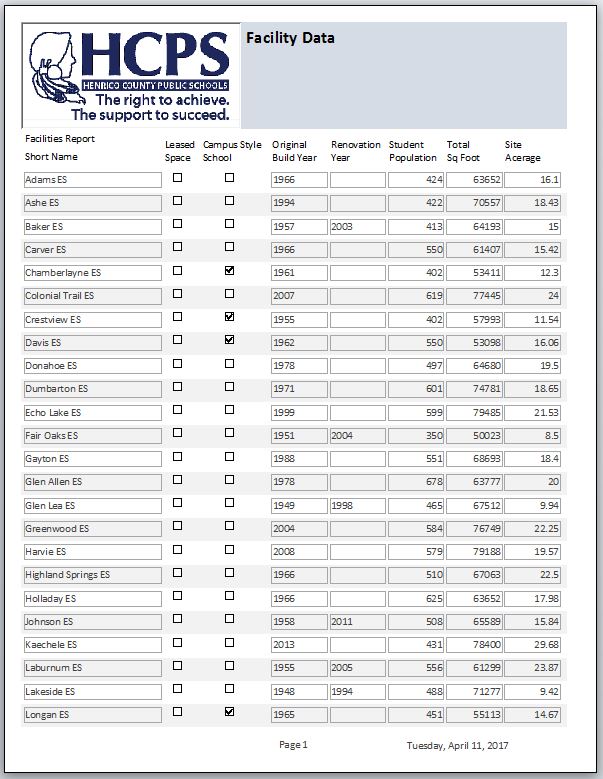
You can use the web to fill images in your Access database. Use a image control, the on current event of the form and the .picture property of the image. You’ll need to create a simple function to retrieve the URL properly into the .picture property
You can use the web to fill images in your Access database. Use a image control, the on current event of the form and the .picture property of the image. You’ll need to create a simple function to retrieve the URL properly into the .picture property
So you’ve noticed that Access doesn’t play well with Dropbox? Because Dropbox uses a synchronization process to put a local version on your desktop, all kinds of nastiness can happen. Your data can overwrite another person’s data when you synch back to drop box. Your Database structure changes may conflict with someone else’s changes. And of course there’s a host of corruption errors we’ve seen occur.
Solution? Don’t use drop box but instead move your data file to MySQL or SQL Server. We prefer MySQL because it’s FREE. It has all the features you as an Access Developer/User need. It will hold an immense amount of data (far more than Access), and it is powerful and fast.
So what do you do? Get MySQL onto your webserver or contact us and we’ll host your data file on our MySQL Server.
Create your tables in MySQL and migrate your data (there’s a wizard for this, or we can do this for you).
Delete your tables in Access and connect your tables to MySQL (You’ll need a driver for your workstations that is a free download from Oracle. Make sure you get the proper version: 32 bit or 64 bit depending on your WORKSTATION’s operating system). Put in a couple of lines of code to check/relink to the MySQL Server upon startup.
That’s it. Now you are properly in the cloud with your Access database and you can share your database worldwide.
You can control your web content with an Access Database. That’s how we run our website(s)!
So, here’s the datacontrolllc.com website showing 3 lists of clients: Subcontracting / Build-Fixing / Integrating
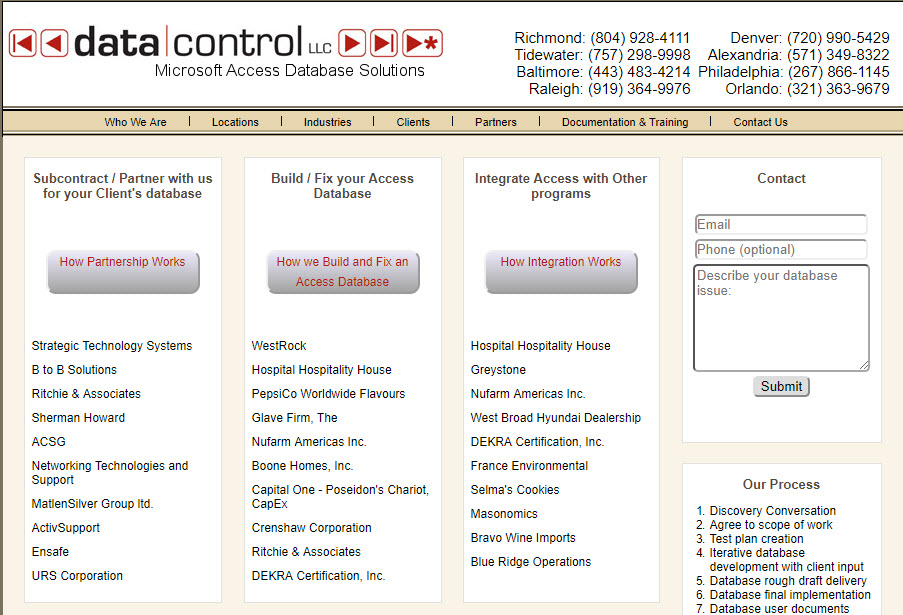
Access Database Providing Content to a Web Page
We’re going to concentrate on the first list of clients: Subcontracting. Notice that the last client in the list is URS Corporation.
Now take a look at our Microsoft Access Database that controls this website’s content:
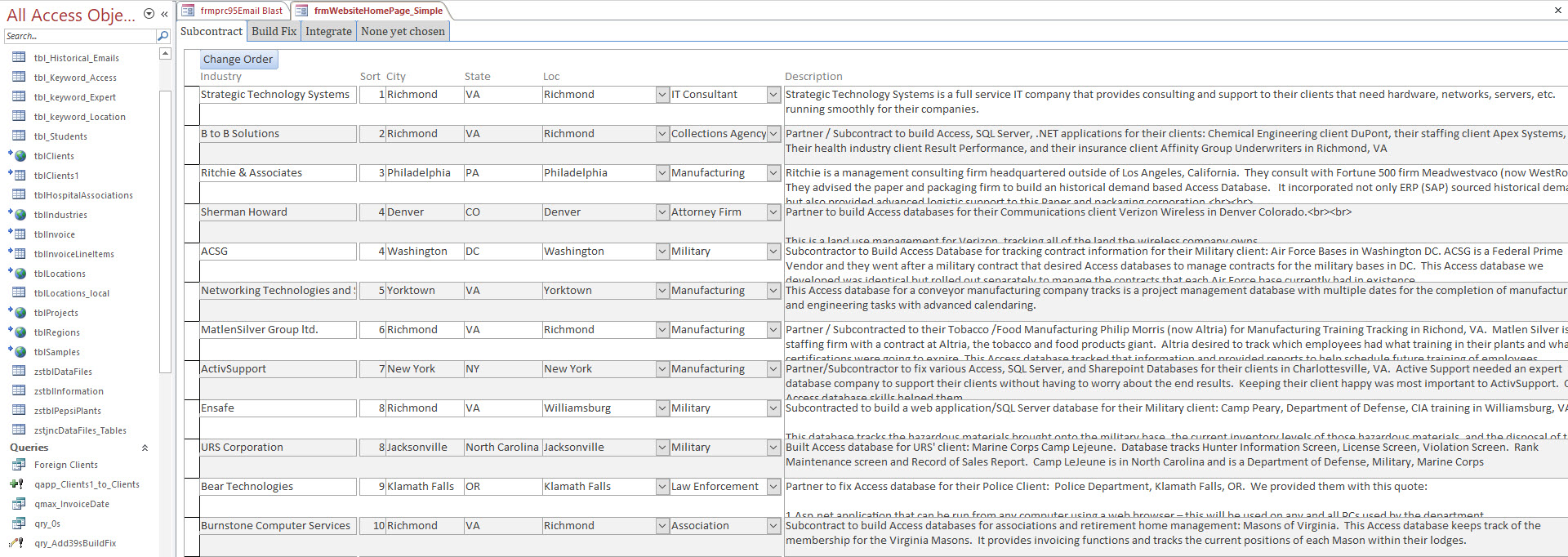
Access Database showing Data that is displayed on Web Site
You’ll notice that we 12 have clients listed with sort orders 1,2,3,4,4,5,6,7,8,8,9,and 10. The website is programmed (that is the list box on the website is tied to a query in a SQL Server database) to show the first 10 clients based on their sort order. Notice that Bear Technologies in the Access database has a sort order of 9. But because there are two clients with a sort order of 4 ( ShermanHoward and ACSG ) and two clients with a sort order of 8 (Ensafe and URS Corporation); Bear Technologies with a sort order of 9 doesn’t make it into the top 10.
So let’s change this. We’re going to change Ensafe’s sort order to 908 in the Access database and then refresh the website page.
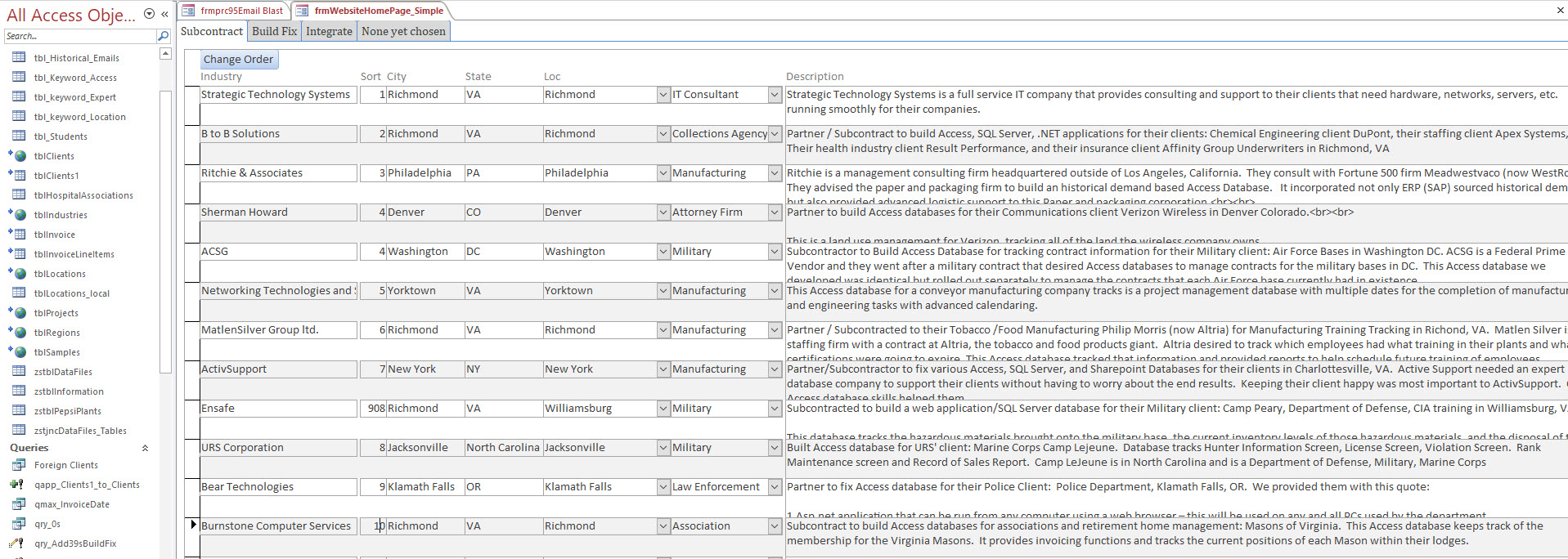
Changing Access Data through a Form/Table that links to SQL Server
Refreshing web page:
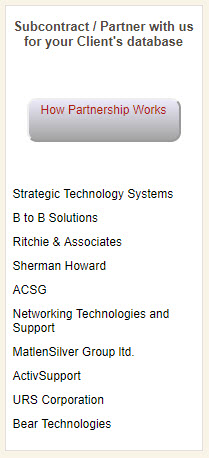
Web List Content coming from Access Database
How does the Access database change the data in the website? Notice the linked tables in the Access database. If we hover over the tblClients table we see that it is actually a SQL Server table located on our web server.
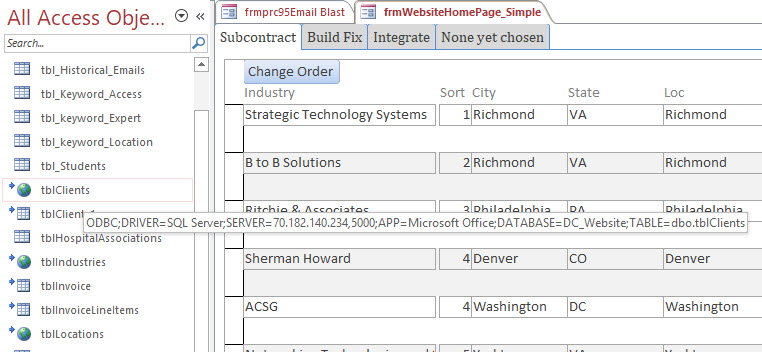
Access Table is Actually a Link To SQL Server on the Web
We built our web page using a WordPress template, then thoroughly modified the entire site with PHP code against a SQL Server Database. We link our Access Database to the SQL Server database as well. So when we want to update the content of the website, we simply open the Access database and make changes. Why is this important? Well, besides the obvious advantage that it is super simple for us to make quick changes to content, Google ranks websites higher if the website is constantly updating the pages.
Guess what? If we change the sort order in our Access database so a different list of clients is 1 – 10, then we’ve changed our website’s data so Google will rank us higher. And how easy is it to simply change sort orders?
Now let’s take a look at the client data for Bear Technologies on the website:
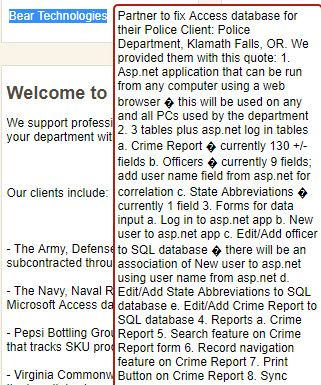
Web Content that needs to be improved through Access Database
This is important content for Google to see to rank us higher. It is very relevant to Access Databases and conveys information on how we implement and subcontract to other clients. However, I notice that there are a bunch of weird ‘?’ symbols. Let’s go change that from the Access database side:

Access Database using Zoom Feature and HTML tags for line breaks
We can’t see the special characters from the zoom in Access. But we know the first one occurs after ‘…using a web browser…’ So apparently our website doesn’t like the ‘-‘ character. We’ll remove this and refresh the screen. We’ll also put in a bunch of <br>,<br> line break tags to space out the text better.
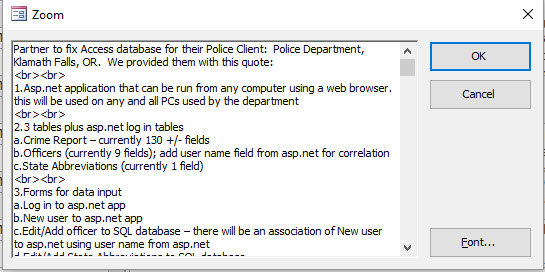
Access Database using Zoom Feature and HTML tags for line breaks
Here are the results of our changes:
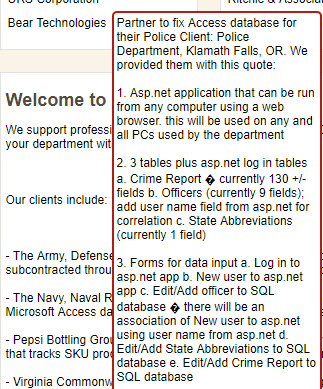
Web Content Modified from Access Database
A little better but not perfect yet. But I hope you now see how you can tie your website’s content to an Access Database. Have your website’s content retrieve from either a SQL Server or MySQL Database on the web server. Then connect your Access database to that same SQL Server/MySQL database and voila!
Here’s a video of me make one of the changes above…
I’m often asked by clients to perform combination filters. That is, not just a single filter on a form. But combining multiple filters that interact with one another.
For instance, in the Marketing Database I’ve built for datacontrolllc.com, I have an email blast functionality that allows me to send bulk emails to my existing clients. I use this to offer monthly discounts for various services. On this email blast form I’ve got a couple of filters that I’d like to use in combination with one another.
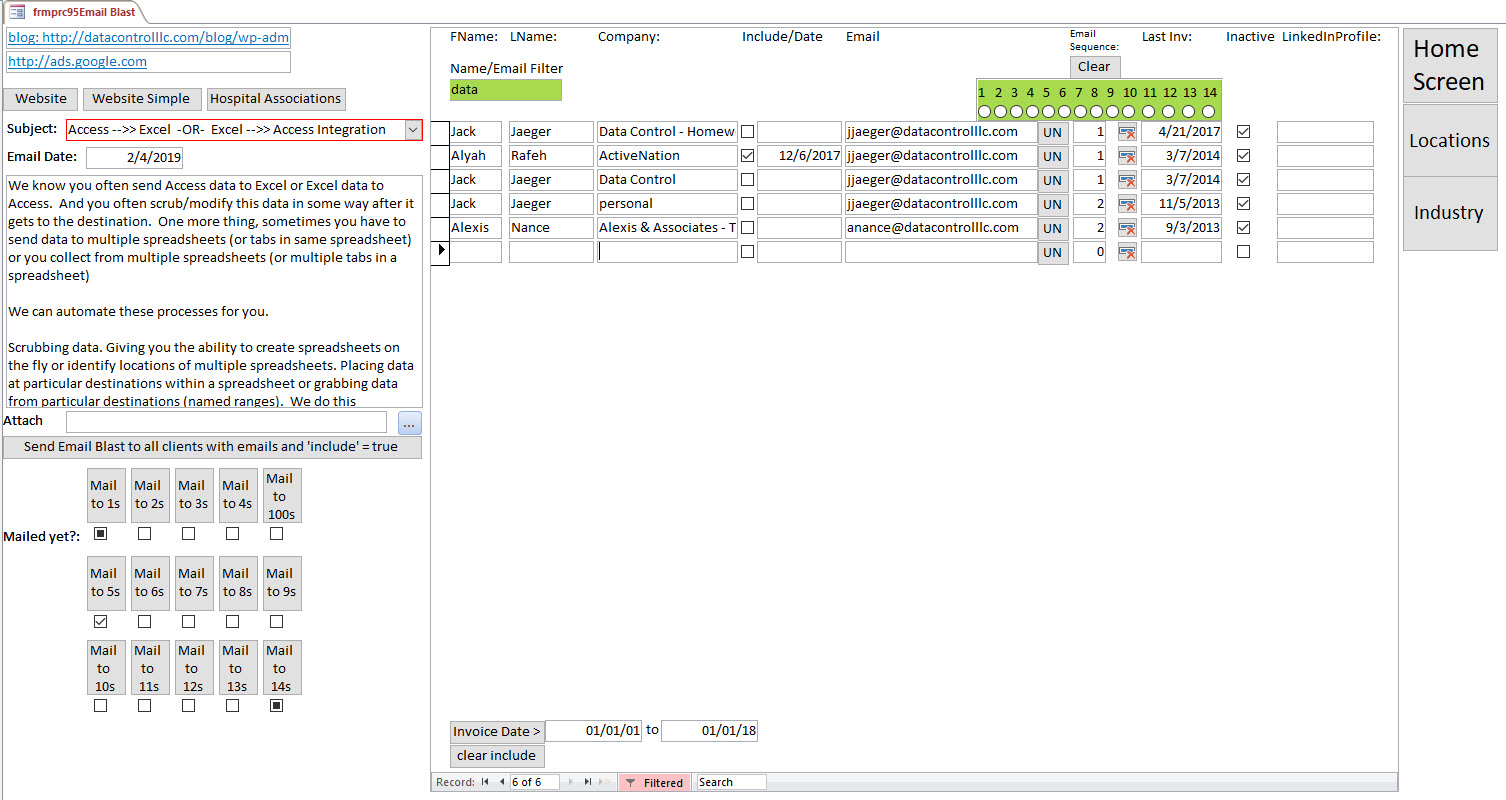
On this form I have two filters, both highlighted in green (our company’s convention for filters). I’ve filtered the form by a single filter, the name/email filter using a wildcard filter of ‘data’ that targets, firstname, lastname and email. Notice I’ve not used the second filter, email sequence.
After typing in a value in the name/email filter, the database automatically filters the form. I approach this with an [EventProcedure] on the after update Event for each of the filter Controls.

Notice that I’ve taken the time to name this control: ‘txtFiltername’. Naming this control in such a way will help me when I write code for this control, and then year’s later when I might modify the code, the name of ‘txtFiltername’ will make a lot more sense to me than ‘text18’
Here’s the code that performs the combination filter:

Email me at ‘jjaeger@datacontrolllc.com’ and I’ll email back this code so you don’t have to copy it.
The first two sub procedures: ‘txtFilterName_AfterUpdate’ and ‘frmFilterEmailSequence’ are the Event Procedures from the two filter controls. These sub procedures simply call another sub procedure: subFilter.
The sub procedure ‘subFilter’ does all of the work. Let’s start with the end of the sub procedure:
Me.FilterOn = False
Me.Filter = strFilter
Me.FilterOn = True
This is how you get a form to filter using code. First you clear the current filter, then you give the filter property of the form a value (in this case a string variable: ‘strFilter’) and then you turn the filter on.
Now let’s take a look at the beginning of the procedure:
Dim strFilter As String
strFilter = “”
Here we establish the strFilter variable and give it a default value: ”
If Not IsNull(frmFilterEmailSequence) Then strFilter = ” AND frmFilterEmailSequence=” & Frame28
If Not IsNull(txtFiltername) Then strFilter = strFilter & ” and (ContactLName like ‘*” & txtFiltername & “*’ OR ContactfName like ‘*” & txtFiltername & “*’ OR Email like ‘*” & txtFiltername & “*’)”
Here we give ‘strFilter’ a value by inspecting our two filter controls. Notice that put an ‘ AND ‘ statement in front of both strFilter values.
Lastly, we expect to have ‘ AND ‘ in front of our filter so remove the and with a ‘RIGHT’ function:
If strFilter <> “” Then strFilter = Right(strFilter, Len(strFilter) – 5)
Notice that trick we use in the txtFiltername section of code. We use ‘(‘ and ‘)’ to combine OR statements and we use ‘Like’ and ‘*’ operators to perform wildcard functions.
Recently we’ve been asked by a number of clients including Roofing Consulting Services (Consultants, Richmond, VA), KnoxMarine (Surveyors, Charleston, SC) and Hirschler Fleischer (Attorney, Richmond, VA) to integrate Access with Word. What these companies have in common is that they produce reports to their clients and they want to both standardize the reports across their company and save their report writers time in producing these reports. A side benefit is that all of the necessary data to create the report is now consolidated in the Access Database. Lastly, because we are using Access to determine where Word Template files are held and where the destination reports go (and how they are named), Access is actually functioning as a light document management tool for the entire report creation and management process.
We accomplish this in Access by using a combination of file system objects (you’ll need to register the library in the access modules) and the Word Object Library (you’ll also need to register this.
We extensively use bookmarks throughout the various Word documents and create .doc or .docx ‘template’ files. These are NOT the Word Template files. They are standard word document files we name ‘Report 1 TEMPLATE.docx’ for example. If the user wants to change their template files, they simply open them and change them, taking care not to bother the highlighted bookmarks.
Here’s an example of extensive bookmarking in a Word document that Access will use to fill in data:
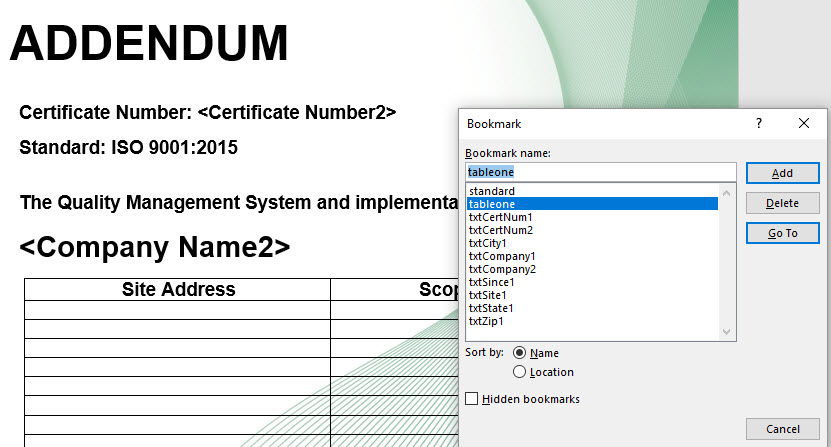
Access Database vba automation of Word through bookmarks
We then create code in Access to copy the template file and name the destination document and place the document where it belongs, often in a file folder with a client id number. Then we scroll through the document replacing the bookmarks with either text from the access database or images from the Access database (actually, Access stores the path and file of the image, not the image itself). Here’s an example of this code…
Function fncLetterToMerge(pLetterToMerge As String, id As Long)
‘pass in a field name in zstblinformation which represents the path to the file to be created
On Error GoTo c12_err
Dim rs As Recordset
Dim strPathAndFileToTemplate As String
Dim strPathAndFileToCreate As String
Dim xENCLOSUREx As String
Dim xGeneralNotesx As String
Dim intAssignedToID As Integer
DoCmd.RunCommand acCmdSaveRecord
If IsNull(DLookup(“PathToReports”, “jobs”, “id = ” & id)) Then
MsgBox “Please supply a path to reports for this file”
Exit Function
End If
‘strPath = DLookup(“defaultexportfolder”, “zstblInformation”)
strPathAndFileToTemplate = DLookup(“defaulttemplatefolder”, “zstblInformation”) & “\” & pLetterToMerge
strPathAndFileToCreate = DLookup(“PathToReports”, “jobs”, “id = ” & id) & “\” & DLookup(“[Job Number]”, “Jobs”, “id = ” & id) & ” – ” & pLetterToMerge
If Right(strPathAndFileToCreate, 4) = “docx” Then
strPathAndFileToCreate = Left(strPathAndFileToCreate, Len(strPathAndFileToCreate) – 14) & “.docx”
Else
strPathAndFileToCreate = Left(strPathAndFileToCreate, Len(strPathAndFileToCreate) – 13) & “.doc”
End If
‘Select Case pLetterToMerge
‘Case Is = “FileNotesMrg”
‘End Select
If FileExists(strPathAndFileToCreate) Then
intReply = MsgBox(“This file already exists. Do you wish to delete and replace with a new version?”, vbOKCancel, “Warning”)
If intReply = 1 Then
Kill strPathAndFileToCreate
Else
Exit Function
End If
End If
intAssignedToID = DLookup(“idtbl_employees”, “tbl_Employees”, “initials = ‘” & DLookup(“[assgn to]”, “jobs”, “id = ” & id) & “‘”)
BuildTemplate:
Dim oWord As Object ‘Word.Application
Dim doc As Object ‘Word.Document
Dim objShapes
Dim xFoundx As String
Dim xRecommendx As String
Set oWord = CreateObject(“Word.Application”)
Set doc = oWord.Documents.Open(strPathAndFileToTemplate)
oWord.Visible = True
doc.SaveAs (strPathAndFileToCreate)
With oWord.ActiveDocument
Select Case pLetterToMerge
Case Is = “XXXXX”
Case Is = “KMSC Photo Sheet – TEMPLATE.docx”
If IsNull(DLookup(“datephotostaken”, “jobs”, “id = ” & [id])) Then
MsgBox “Please enter the date the photos were taken on the main form”
Exit Function
End If
.Bookmarks(“xxClaimNumberxx”).Select
If Not IsNull(DLookup(“[claim number]”, “Jobs”, “id = ” & id)) Then oWord.Selection.Text = DLookup(“[claim number]”, “Jobs”, “id = ” & id)
.Bookmarks(“xxJobNumberxx”).Select
If Not IsNull(DLookup(“[Job Number]”, “Jobs”, “id = ” & id)) Then oWord.Selection.Text = DLookup(“[Job Number]”, “Jobs”, “id = ” & id)
.Bookmarks(“xDatex”).Select
If Not IsNull(DLookup(“[datephotostaken]”, “Jobs”, “id = ” & id)) Then oWord.Selection.Text = DLookup(“[datephotostaken]”, “Jobs”, “id = ” & id)
.Bookmarks(“xDatex”).Select
If Not IsNull(DLookup(“[datephotostaken]”, “Jobs”, “id = ” & id)) Then oWord.Selection.Text = DLookup(“[datephotostaken]”, “Jobs”, “id = ” & id)
‘i = 0
‘Set rs = CurrentDb.OpenRecordset(“select * from trptPhotoSheet where id = ” & id)
‘Do Until rs.EOF
‘ i = i + 1
‘If Not IsNull(rs!PhotoPathAndFile) Then .Bookmarks(“xxPhoto” & i & “xx”).Range.InlineShapes.AddPicture FileName:=rs!PhotoPathAndFile
‘ .Bookmarks(“xxPhoto” & i & “xx”).Select
‘If Not IsNull(rs!PhotoCaption) Then oWord.Selection.Text = rs!PhotoCaption
‘ rs.MoveNext
‘Loop
For i = 1 To 10
If Not IsNull(DLookup(“photo” & i, “Jobs”, “id = ” & id)) Then
.Bookmarks(“xxPhoto” & i & “xx”).Range.InlineShapes.AddPicture FileName:=DLookup(“photo” & i, “Jobs”, “id = ” & id)
‘.Bookmarks(“xxPhoto” & i & “xx”).Select
.Bookmarks(“xxPhotoCaption” & i & “xx”).Select
If Not IsNull(DLookup(“photocaption” & i, “Jobs”, “id = ” & id)) Then oWord.Selection.Text = DLookup(“photocaption” & i, “Jobs”, “id = ” & id)
End If
Next
Throughout 2017, we were approached by a number of clients including KnoxMarine (Charleston, SC) and SeniorSmart (Sykesville, MD) to fix their ‘Cloud’ Access databases. They were both using Microsoft Cloud to hold their Access Database files and were very disappointed with the results. Primarily because this cloud solution creates a temporary copy of the Access Database on the local workstation, then overwrites the cloud version when the file is closed.
This, of course, means that if two users have the database open simultaneously, when the second user closes their version of the database, the first user’s database changes will be overwritten.
So what is a true Cloud Solution for an Access Database? Then Answer: SQL Server or MySQL.
What you do is move your tables into SQL Server or MySQL. This database needs to reside on a server that is on the internet (for instance, The Data Control LLC server we offer for $50/month). Then modify your Access Database to connect to these tables through the internet. We’ve done this for API Services (Newport News, VA) and HORWITZ, RICHARDSON & BAKER, LLC (Chicago, IL)
For instance:
Dim rs As Recordset
Dim db As Database
Set rs = CurrentDb.OpenRecordset(“Select * from zstjncDataFiles_Tables Where DataFileID = 1”)
Set db = CurrentDb
Dim strWebIP As String
strWebIP = DLookup(“BackEndWebServer”, “zstblInformation”)
While Not rs.EOF
If UpdateSQLConnection(rs!SourceTableName, rs!DisplayTableName, “TCP/IP Address”, “ServerName”, “DatabaseName”, “Password”, “1”) Then
rs.MoveNext
Else
MsgBox “Connecting to SQL Server failed.”
Exit Sub
End If
Wend
err_Procedure:
MsgBox Err & “: ” & Err.Description
Resume exit_Procedure
End Sub
If you’d like us to host your database in our cloud, we’ll convert your database for free. If you want to host your database somewhere else, we’ll give you a price to convert the tables for you and modify your Access Database to use the new tables.
You can manage your texting using an Access Database. Contact us at www.datacontrolllc.com or jjaeger@datacontrolllc.com to learn more. You can purchase this Access database for $100.00
So we built this application for 1st Market Bank which has since become Union. We’ve also sold it to 1st Capital Bank which is now Sterling.
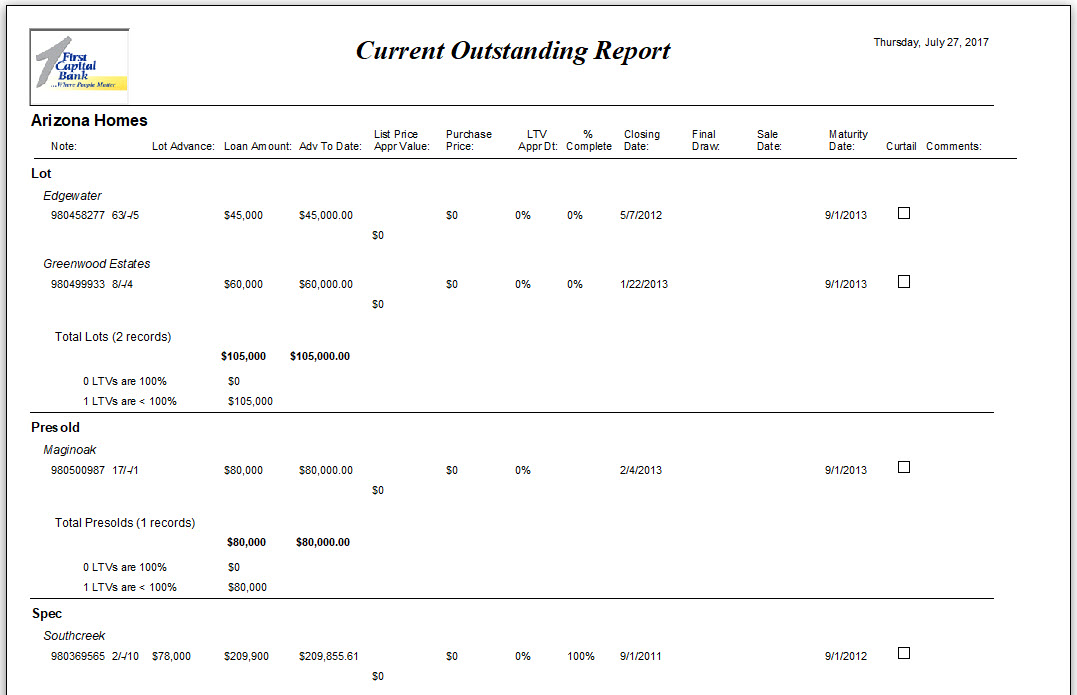
Essentially, the user records all of the relevant information about Customer’s and their loans for real estate construction deals including the development the home is in and then the Bank may run 30 different reports to manage their portfolio.
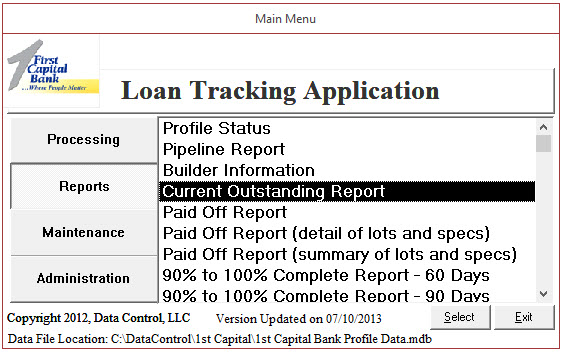
The Customer information and small part of the loan information:

Example of the Current Outstanding Report:
If you’d like a similar database, don’t hesitate to contact us and we can either build you a similar application from scratch, or modify this application to your needs!
So you have a list of emails and you want to keep in contact with folks easily.
I do this by periodically sending out emails to my former clients and offering them incentives to come back and purchase again. Since I already have their contact information in our Access Database for Invoicing, it makes sense to email them from here as well.
This is an example of an Access Database that interacts with Outlook using Automation and VBA Code.
On the right side, I’ve assigned my contacts and email sequence number:
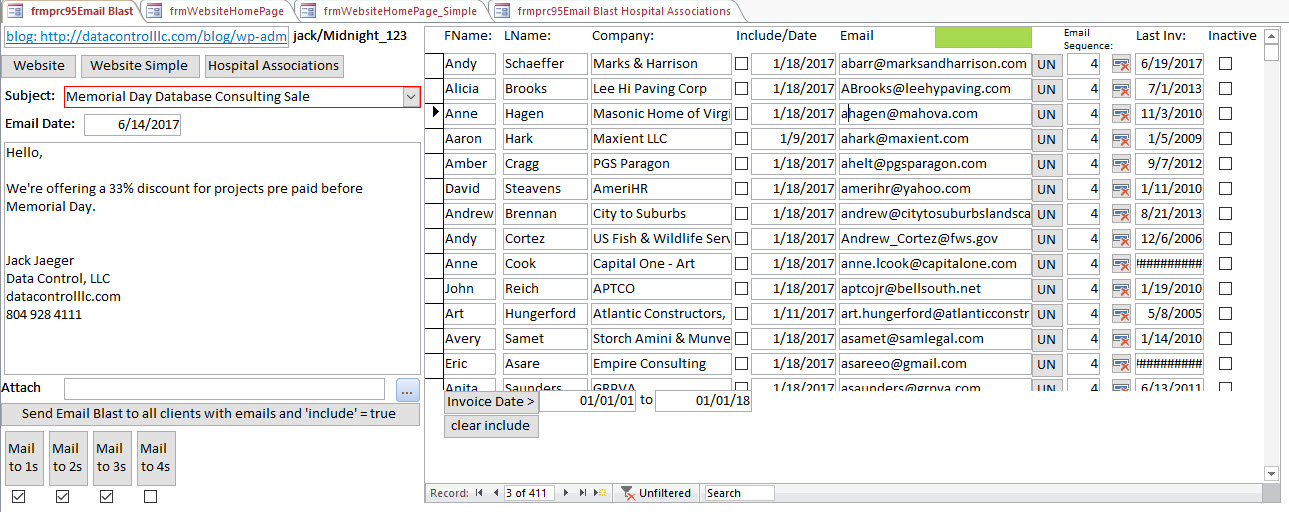
On the left hand side I’ve created buttons for emailing groups of people based on their email sequence.
The drop down box with ‘Memorial Day Database Consulting Sale’ may be double clicked to open another screen for creating email messages:
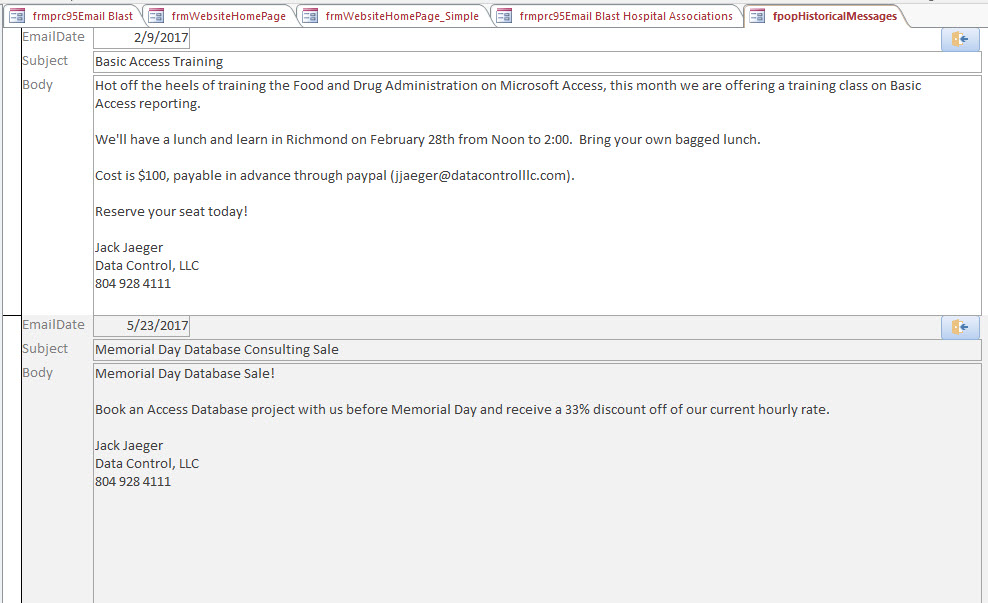
When you’ve chosen the group of people to email (keep the groups small so you aren’ considered a spammer) and you’ve chosen your message, you may then email the group by choosing one of the ‘Mail to…’ buttons.
This is the code that runs behind the button to send the emails:
=fncSendEmail(1)
Set rs = CurrentDb.OpenRecordset(“select * from tblHospitalAssociations where EmailSequence = ” & pEmailSequence & ” and Email<>’Unknown'”)
rs.MoveLast
rs.MoveFirst
‘If rs.RecordCount > 3 Then Stop
Set objOutlook = CreateObject(“Outlook.Application”)
Do Until rs.EOF
‘Stop
Set objOutlookMsg = objOutlook.CreateItem(olMailItem)
With objOutlookMsg
Set objOutlookRecip = .Recipients.Add(rs![Email])
objOutlookRecip.Type = olTo
.Subject = txtSubject
.Body = txtMessage
If Not IsNull(txtAttachment) Then
strAttachment = txtAttachment
Set objOutlookAttach = .Attachments.Add(strAttachment)
End If ‘.Importance = olImportanceHigh ‘High importance
.Display
.Send
‘CurrentDb.Execute “INSERT INTO tbl_Email_History ( ClientID, EmailSentDate, EmailSubject, EmailBody ) ” & _
“SELECT ” & rs!ClientID & “, Date(), ‘” & txtSubject & “‘, ‘” & txtMessage & “‘”
Loop
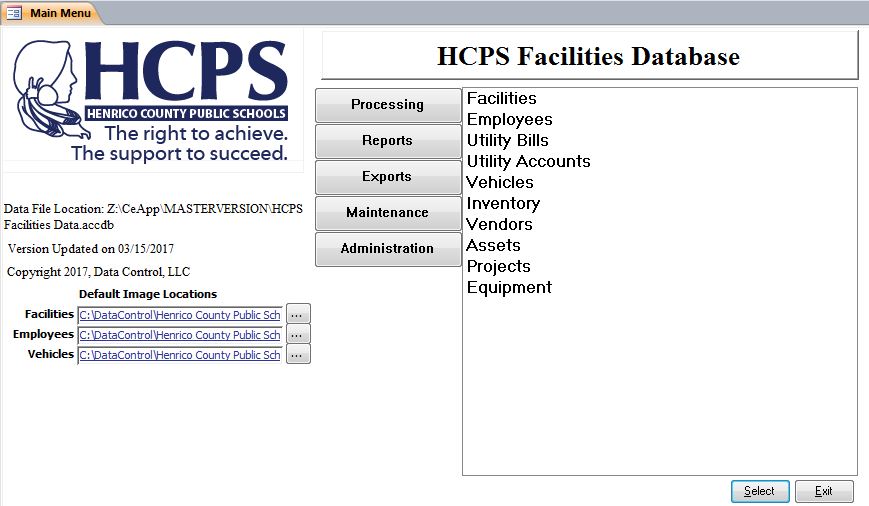
We’re particularly proud to work with one of the best counties in the United Stated (and the home of Data Control, LLC!) We have built and implemented an Asset / Facility / Project tracking database for Henrico County School Systems.
If you’d like a demonstration of this database to see if it would work for your County, then please call us and set up a shared view session to see a demonstration.
The Processing Choices:
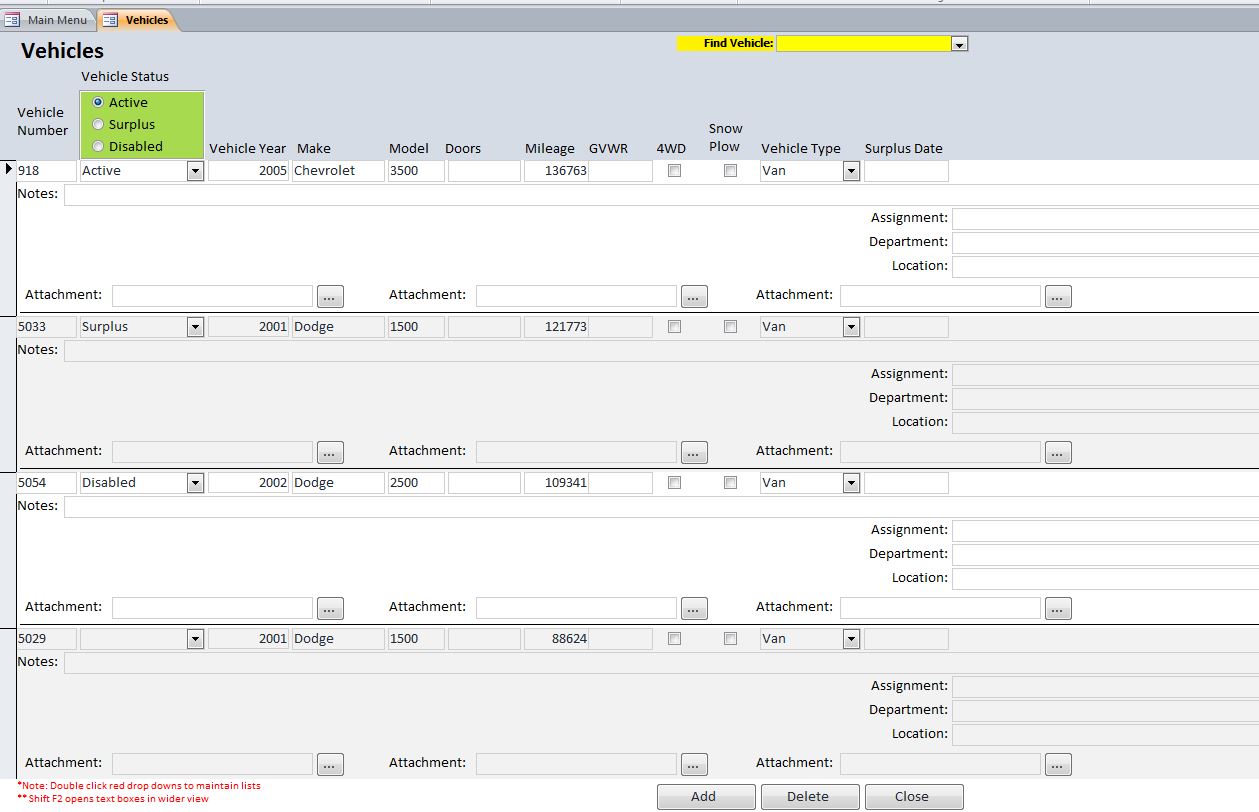
Vehicle Data Entry:
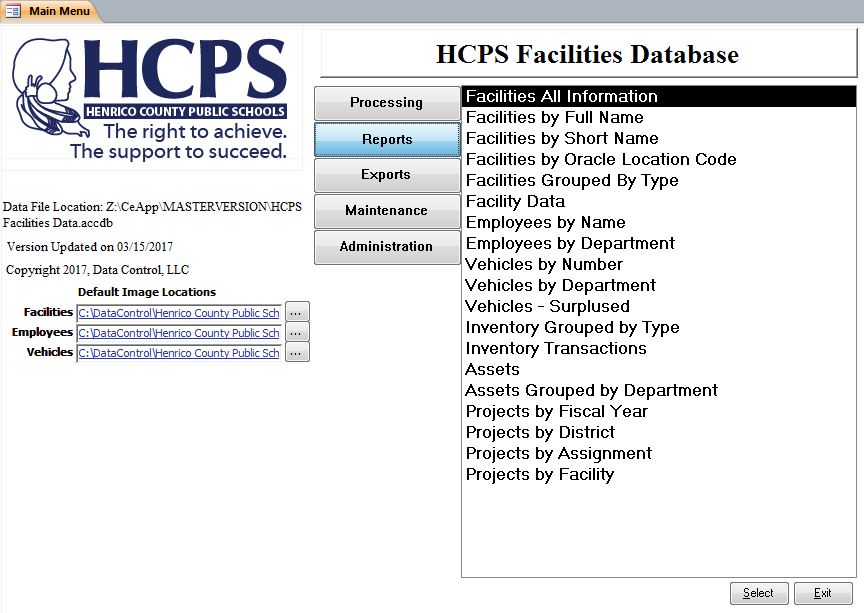
The Reports:
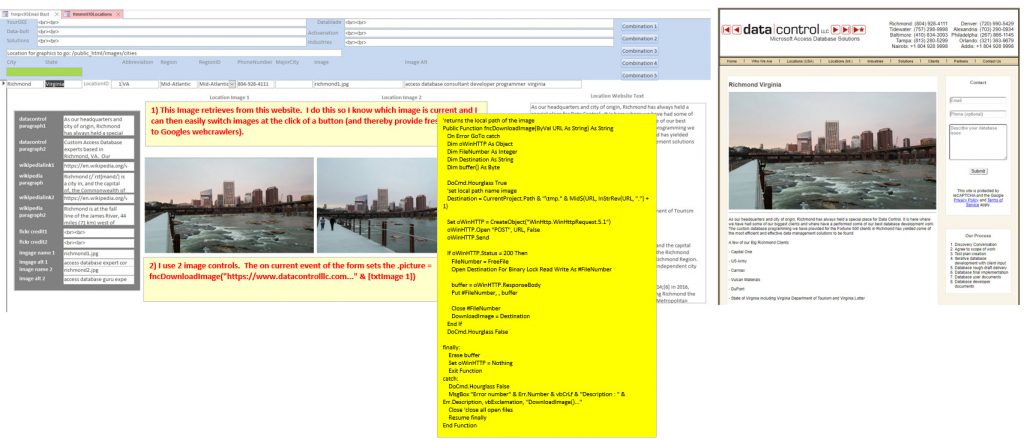
The Facility Data Report: